Sunday, June 28, 2020

Thursday, August 26, 2010
Reflective Synopsis
E-learning plays a very important role in the 21st century as students are growing more reliant on today's technologies. Teachers see the need for e-learning because it can promote enhanced learning experiences through the use of ICTs. As a student studying at Central Queensland University via Distance Education, E-learning and the use of ICT is currently playing a large role in my studies as all of my courses are undertaken online. E-learning provides me and other students an opportunity to utilise a range of tools available on the web and other digital devices to enhance my knowledge and development in various areas. Without the use of ICTs, my learning experience would be dramatically halted as it is one of the major factors that my courses are structured upon. ICTs help to streamline learning by the use of websites to provide structured learning as well as resources that will help me to engage in the content.
Because I am not going to be a teacher, it is quite difficult to apply a context to who and where e-learning would be focused on. However, as a multimedia student, e-learning definitely plays a fundamental role in university students' lives and they would not be able to manage without ICTs. So , I will be explaining how the use of different ICTs will play a part if I were to teach a multimedia class and how I would use them to enhance the students learning experience by including these valuable tools. The context in which e-learning will be engaged in is with university students studying film and media. Therefore, the class infrastructure will be mainly to rely on technologies such as blogging websites and videos. By engaging students into these technologies, they will be able to create content and upload it to the web for others to view and give feedback on. The use of ICTs in this teaching context will be relatively streamlined as the course is based on multimedia. By utilising the available tools, teachers and students can find it easier to learn in this environment. There will be many opportunities that can be engaged in this course, however, I have selected four core ICT tools that will be put to good use. These tools are Websites, Blogs, YouTube and Flickr.
Websites
First of all, websites are an excellent tool for showing the world all the work you have created and it can serve as a portfolio which will be built and maintained. They can create their website using the popular program Dreamweaver or use templates provided by the website host. A website is a very important tool in the learning process as you are able to gain knowledge in building websites and it provides an electronic space on the internet to display a portfolio of all your work. A website will help to support great e-learning experiences because they are what e-learning is all about. Without websites, the internet would not exist and learning how to create and build a website will help you to gain more knowledge in how the internet works, while being a part of it. From my own experience, I have created a website for a portfolio which displays all my work that I have done over the years. I previously blogged about my website here:
http://davidpierson-dvd.blogspot.com/2009/11/stritec-productions.html
Blogs
Blogs are another important tool when it comes to e-learning because it helps teachers to provide resources to students and also share ideas and reflect on work being undertaken in class. Collaboration is also another major factor when considering blogs as they can help in communicating with others by commenting on their postings. Teachers can share links and tools, but it works both ways, as students can also share alike providing a real-time reflection and deep thinking about the tools and ICTs on the web. By establishing a blog, students are also able to post about projects they may be working on, where others can provide feedback and motivation to keep pursuing their goal that they set out to do. For example, blogging can be integrated into the class work where students may have to research about different ICTs on the web. Instead of writing it down on paper, they can make regular blog postings for others to see, read and comment on. A perfect example of this is the blog you are reading now! And also another blog posting I previously made!
YouTube
YouTube is the world's most popular online video sharing site and allows millions of people to watch using created videos. It is an excellent tool for e-learning as you can gain information and knowledge by watching a wide range of videos on the website. Here is a good example of looking at how other visual effects artists do their work. Students can also upload their created content by utilising YouTube to show their work and be seen all around the world. This takes another step forward in the use of ICTs as the videos students' have created can be embedded into their website, linking the content together. It will not only provide an interactive portfolio, but will enhance and develop students skills with ICTs by using tools that will be a vital factor now and in the future. I have been doing this for a while now with my website and you can see how I utilised YouTube on my website here. In education, using multimedia videos is a strengthening component in many ways and incorporating internet based tools will improve participation and learning. Having students completing a class project that involves films or videos can be enhanced by being uploaded to YouTube. Therefore, other students and people around the world can view, share and discuss about the topic, providing a great community with collaboration and feedback.
Flickr
Using images in teaching and learning give a positive reaction from students. By using images in presentations, teachers can engage students in a deeper learning level. Everyone can get different outlooks by viewing pictures and this is how we can help embrace visual enhancements in lectures and instructions. Flickr is the perfect tool for this as it is targeted to a wide range of users, from photographers to families. Flickr has made it easy for users to upload and share photos. It exists to connect users together by uploading their photos for the world to see, or family photos so relatives can view them across the world. By using Flickr, people can build communities and share their ideas with others and also use images under the creative commons license. These images can be used for teaching materials as it provides an excellent media outlet for photos. Teachers can utilise this tool to use images in their course work to create a good overall balance to the presentation. Here is an example of an embedded Flickr Image. Flickr can help develop people's skills in photography when others give feedback by sharing their views and opinions. Photos also help to tell their stories and promote students' work. Students can utilise this tool to get photos out into the world for others to see and comment on. They can also use Flickr to embed photos into their website and display it for others to see. An example of this is my website, in which I use Flickr to host and embed my photos. You can view my photos at http://www.stritecproductions.webs.com/photo.html.
I have investigated these four core tools first of all to show how e-learning can help to promote growth and development through teaching. Furthermore, to demonstrate that students can utilise these tools to connect and share with others. By using tools like Websites, Blogs, YouTube and Flickr, students can impart their work where it can be given feedback on and rated. By building a website, students can show their work as a portfolio for other users and even potential employers to see. E-learning provides many opportunities for students to gain knowledge and to grow in the technology world. E-learning is essential for students as it promotes enhanced learning experiences through the use of ICTs. A multimedia teacher would connect with these core ICT tools because it helps to engage students in a deeper learning level. This shows Productive Pedagogies as learning should be engaging and intellectually challenging in a relevant curriculum through a supportive environment. By having this knowledge and ability, I can investigate new technologies to enhance learning in the classroom through the use of ICTs. Teachers need to keep up-to-date with the constantly changing technology so that they can deliver the most effective learning environment for students in the 21st century classroom. One thing is for certain though, my e-learning journey is just beginning!
References:
Department of Education, Blogs in Education, viewed 23 August 2010, http://www.det.wa.edu.au/education/cmis/eval/curriculum/ict/weblogs/
My Integrating Technology Journey, Using Flickr in Education, viewed 23 August 2010, http://www.det.wa.edu.au/education/cmis/eval/curriculum/ict/weblogs/
Sabah Karimi, The Value of E-Learning with YouTube: Video Sharing for Education, viewed 23 August 2010, http://www.associatedcontent.com/article/65889/the_value_of_elearning_with_youtube.html?singlepage=true&cat=35
Blogs Commented On:
http://davidpierson-dvd.blogspot.com/2010/08/other-e-learning-blogs.html
Other E-Learning Blogs
http://tashaselearningblog.blogspot.com/2010/07/powerpointso-much-more-than-slideshow.html#comments
http://tashaselearningblog.blogspot.com/2010/07/blog-vs-wiki-open-style-of-wiki-can-be.html#comments
http://emmas-elearning.blogspot.com/2010/08/google-maps.html
http://matthollett.blogspot.com/2010/08/digital-video.html
Play that Podcast
(note: contains small violence)
Tuesday, August 3, 2010
Is your Mind Mapped?
 Creating a Mind Map is very easy and you don't need any software to do so. By simply visiting the site http://bubbl.us/, users can easily create a mind map that branches off into different areas. Mind maps are great to unleash creative thinking, linking thoughts to a central idea. The example I have created shows how the course I am doing (E-Learning) is linked together. This course encourages people to get involved with ITC's and use the various tools available on the internet. It also considers everyone's different learning styles, whether it is visual or logical. Collaboration should also be a part of every course, were students can use online sources such a forums to communicate with others.
Mind maps give an overall view of how different areas are linked to each other and is a good visual tool to which can also be used by teachers to engage students in their studies.
Videos are Very Cool
YouTube can help teachers to show students course work, and show them examples of what sort of work professionals do. It is also a very useful tool for getting your work seen by others. Here's a promo that I created for my local church.
Monday, August 2, 2010
Embed Google Maps into Websites and Blogs
View Larger Map
Tuesday, July 20, 2010
Learning Styles
So I took the test and here are the results.

By looking at the data, my learning style is positioned more towards the visual and creative side. I prefer to to practical rather than theory as I am more into creative media such as videography and photography. The downside to this, is that with theory based assignments such as reports and essay, I tend to not do as well as practical assignments. I much prefer to get out and film and edit footage, rather than write up a 3000 word essay. I rather leaning visually than verbally with graphics and charts as it is easier to remember and I can always refer back to the information.
Because everyone is different, teachers need to cater for everyone's learning styles, where other students may excel in theory based assignments but not as well in practical work. There has to be a balance between each area, so students can do well in their positioned area, and also develop their skills that they are not as good in. Some students may also be better at listening, where others will find graphics and charts easier to understand. Teachers have to structure their courses to accommodate all learning styles, so that every student can obtain better results.
Get Blogging!

http://www.flickr.com/photos/daviderickson/ | CC BY-NC 2.0
Yes blogs, they allow people to express their views, converse topics or even discuss e-learning in the 21st century! Blogs have been around for ages, but only now have I created one for course I am currently doing (Managing e-learning). Blogs give you a feeling of ownership and community by posting your own views to an audience who will listen and also reflect on you work, giving you feedback and comments.
Blogs are also very useful in the classroom, as students and teachers can comment on assignments they are working on, as well as collaborate together to form ideas on certain topics. They can also be utilised to keep students on track, by posting updates on what area they should be working on each week. Blogs can also be used for linking to other resources that will help students in their coursework and many other uses. The possibilities of blogs are endless.
E-Learning in the 21st Centurary
Monday, November 16, 2009
Stritec Productions
http://www.StritecProductions.webs.com

This is all my work including Videography, Photography, Graphics and Web Design. Browse my work, leave a comment on the contact page, tell me what you think.
"Stritec Productions is focused on developing media to a high standard, where we work in various areas including Videography, Photography and Imaging, Software Development, Web Design and 3D modelling and animation. We offer many services, and we will undertake any project with a high level of quality for both personal and professional work. Browse the website and feel free to give us feedback on the contact page."
Websites are important to share information with others and can be a good tool for resources and programs. Websites can also serve as a portfolio to show others your work, just as I have done with Stritec Productions
Wednesday, August 12, 2009
VoiceThread, so that's what I heard!
 VoiceThreadis an online service which provides a collaborative multimedia slide show, displaying documents, images and videos. Users can upload this content, and display it for others to see. It is fully online and a very interactive slide show presentation website. It provides much more than the standard PowerPoint, as people can also leave comments in many different ways. They can comment by text, voice, webcam and also with and audio file. VoiceThreads also can be imbedded into websites and blogs where users can comment, as well as the ability to be exported to mp3 or DVDs.
VoiceThread, 2009, VoiceThread, viewed 13 August 2009, http://voicethread.com/about/
Tuesday, August 11, 2009
It Must Be Music!
 Music is very convenient, as it can break a silence and convey a mood. Music has been all around us, and many websites offer royalty free music that can be downloaded and used in various productions and work under the creative commons license. You can also download different beats and compose a score as well as a range of different sound effects are available. Teachers can use music for use in PowerPoint presentations, providing a better experience for students. You can also use music and sound effects in slide shows and short films. Here's TV commercial that I did for one of my university courses.
iPhone Commercial By David Pierson at Stritec Productions
Monday, August 10, 2009
File Hosting
 File hosting websites like MediaFire, provides users with storage space on servers, so they can upload files to share with others. These services are good for teaching, as teachers can upload various course work, and the students can access the files. Students studying a course externally will also greatly benefit as they can download the files at any location with an internet connection. The file hosting services also allow users to upload images and display them on blogs and websites just like I have done below.
 This image was part of a short Film that I did some time ago. To view the short film, go to Stritec Pictures
This image is copyright (C) Stritec Pictures 2009. All Rights Reserved
Sunday, August 9, 2009
Web Quests
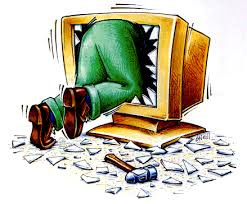 A Web Quest is a web page that is composed of information and activities, using internet resources to encourage students to use their knowledge to solve problems. Teachers make Web Quests for students, where they are provided with online resources and are asked to use the information to solve the presented problem. Web Quests are very popular with teachers, as it is a new way to give students activities rather than using the old method of using pen and paper. However, making a Web Quest requires quite some time, as teachers have to research the information they seek and the compose a scenario that the student have to try and solve. They then have to publish the Web Quest using a web authoring tool like DreamWeaver and upload it to a website hosting service so it can be viewed by students. This takes more time, but once it has been completed, the quest will be a more exciting adventure, that is, if you do it right!
References:
WebQuest Direct, 2009, What is a WebQuest, viewed 10 August 2009, http://www.webquestdirect.com.au/whatis_awq.asp
Tom March, 2003, The learning power of WebQuests, viewed 10 August 2009, http://tommarch.com/writings/wq_power.php
Thursday, August 6, 2009
Earthly Enough?
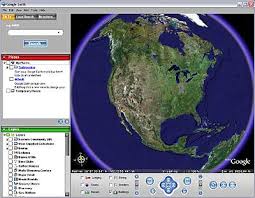 Google Earth is a program that displays satellite images of the Earth, allowing users to see houses streets and landmarks in a birds eye view. The program also allows you to enter in a address and the camera will fly to the location. Teachers can also use Google Earth as a learning program for students to explore, keeping them up to date with the latest technologies. They can use Google Earth for geography and showing students landmarks and countries they may be researching. It also helps students and teachers learn the new technologies and they can upload photos of a location and add it to Google Earth.
Wednesday, August 5, 2009
Podcasts
 The word Podcast, is a combination between the word iPod and broadcast. But you don't need an iPod to enjoy the benefits of podcasts, as they can be played back on a computer. They are small audio files that can be downloaded and viewed by others. They are very useful for teachers, as they can upload a recording of a lecture and students can listen to it. It is particularly great for students that are studying a course online and also is useful for providing new and updated information. Creating a podcast is similar to blogging, although instead of words, users can listen to what you say. This gives a greater atmosphere to the listeners providing an experience where the audience feels like they going on the same journey.
References:
tech FAQ, 2009, What Are Podcasts, viewed 6 August 2009,http://www.tech-faq.com/podcasts.shtml
Tuesday, August 4, 2009
YouBet it's YouTube
YouTube can help teachers to show students course work, and show them examples of what sort of work professionals do. Here is an example of a VFX breakdown of a video done by Dan Stevers.
Test Time!

Class Maker is a test creation tool that Teachers can use to test their students. It is very useful and has many options, enabling you to provide many different types of questions to quiz the students. Writing the questions is simple, and you can choose how many points one will get if they answer correctly. Class Maker takes it to the next step in tests, as it is fully online and there is no paper needed. This is great for students studying externally and is simply more convenient than picking up a pen and paper. Try out the 1 question test I made with Class Maker here. To visit the Class Maker website, go to http://www.classmarker.com
Monday, August 3, 2009
Lets Have A Picnik
Picnik is an online photo editing service, where you can add effects and apply text and stickers to images that you upload. The service has a lot of options but is not as good as an application like Photoshop or even free programs like Paint.net. The loading times are quite long, even with a 256kb internet connection, but the service is good for spicing up photos and is very easy to use. Here's an images I did using Picnik.
